قم بتمييز الملف AppImage القابل للتنفيذ في خصائص الملف
قم بتشغيل AppImage أو قم بتثبيت حزمة توزيعة إذا كنت تفضل ذلك
بالنسبة لـ Proton على Steam، ضع ملف .forceproton في دليل اللعبة كحل مؤقت
How to Install R2ModMan?
Follow this Windows walkthrough after downloading the Thunderstore zip. Each step matches the official installer — version numbers in screenshots may differ slightly from the latest release.
01
Extract archive
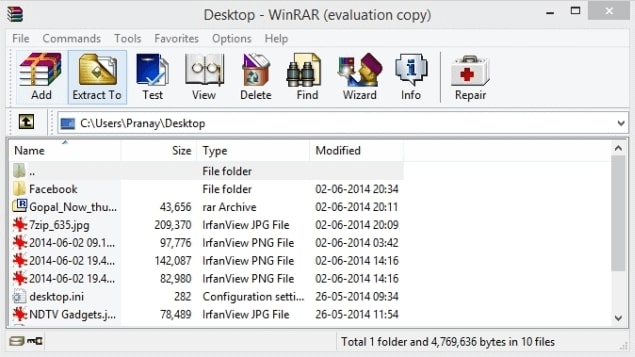
احصل على الإصدار the R2ModMan zip from an official source, open it in WinRAR or another archive tool, and click Extract To to unpack the files into a folder you control.
Step 1 · Extract archive
Click to enlarge
02
Run setup
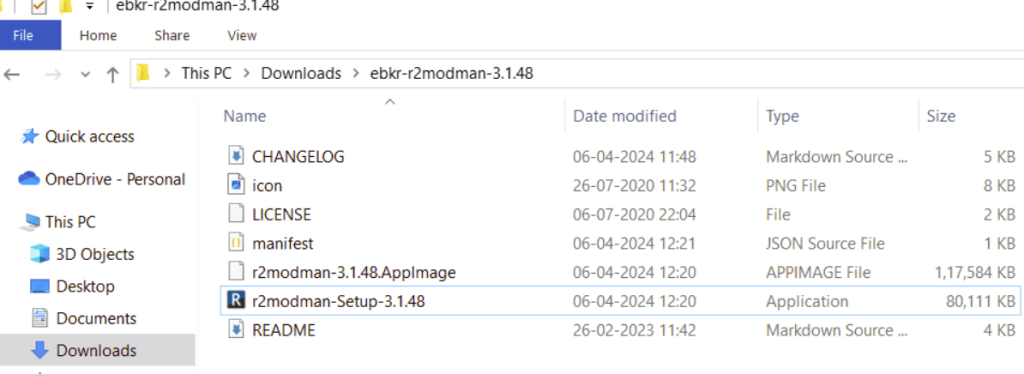
Open the extracted folder and double-click r2modman-Setup (the version number in the filename may differ). This launches the Windows installer.
Step 2 · Run setup
Click to enlarge
03
Installation scope
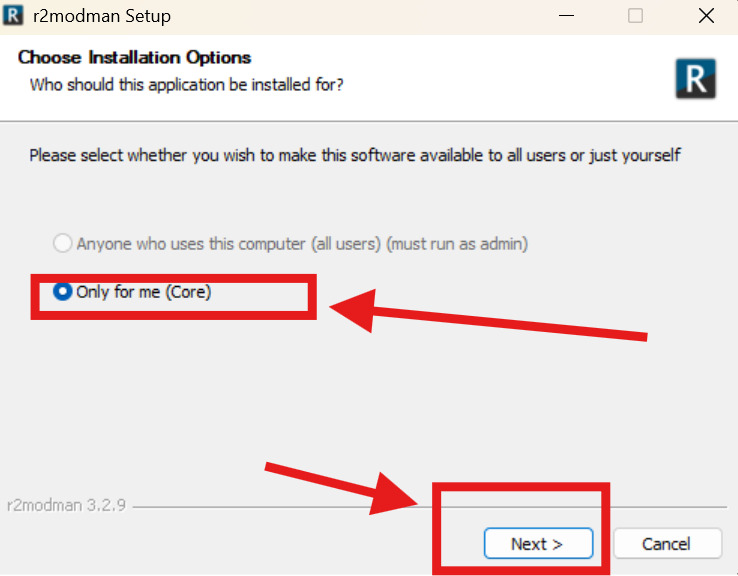
When asked who the app is for, select Only for me for a standard per-user install (recommended). Choose all-users only if you need a system-wide install and can run as administrator. Click Next.
Step 3 · Installation scope
Click to enlarge
04
Install location
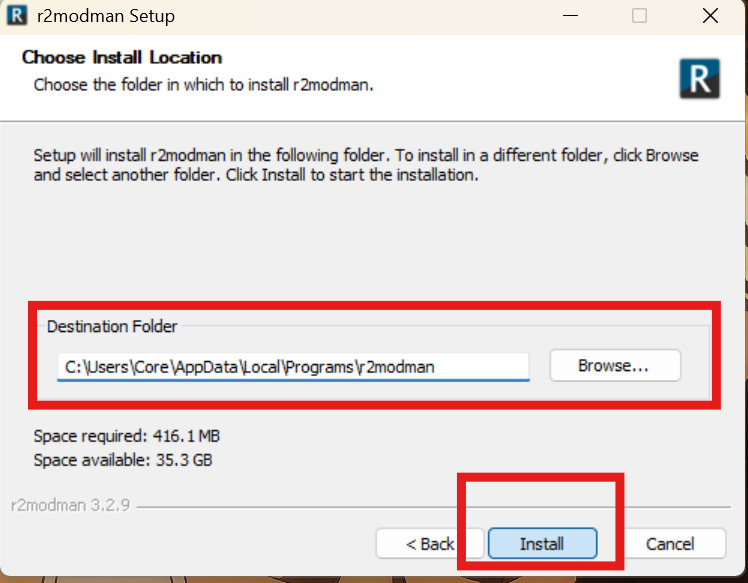
Review the destination folder — the default path under AppData\Local\Programs\r2modman works for most users. Use Browse to change it if needed, then click Install.
Step 4 · Install location
Click to enlarge
05
Finish setup
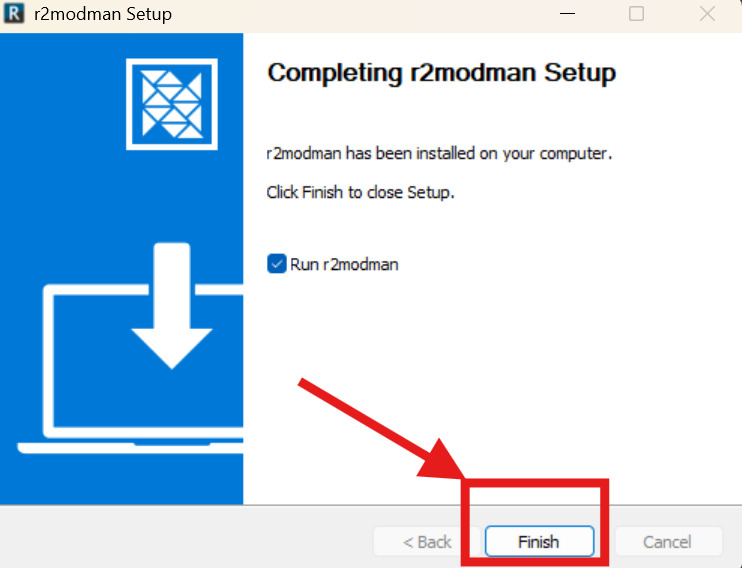
When setup completes, leave Run r2modman checked to open the app immediately, then click Finish. Select your game from the grid and create your first profile.
After installing the manager, pick your game from the grid, create a profile, and browse Thunderstore for mods. Risk of Rain 2, Valheim, Lethal Company, and dozens of other Unity titles are supported.
How to Update R2ModMan Mods?
Keeping mods current is straightforward. There are two ways to update mods inside the manager:
Method 1: One by One
✓ Open the profile that contains the mods you want to update.
✓ Click the Installed tab in the sidebar.
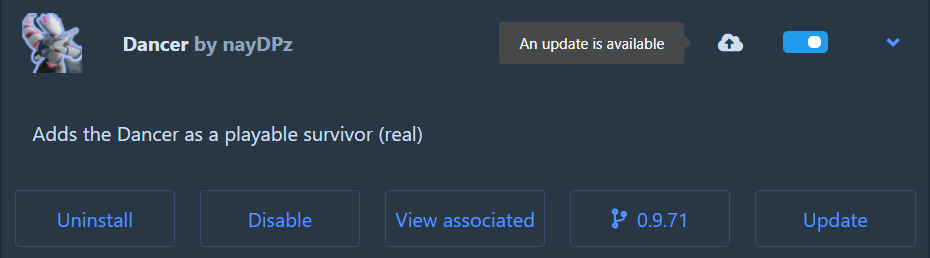
✓ Select a mod that shows the cloud update icon.
✓ Press Update on the mod card.
✓ Confirm احصل على الإصدار with dependencies when prompted.
You can also click the cloud icon on a mod card directly to update without opening full details — useful when updating one mod at a time after a game patch.
Method 1 · Update one mod
Single mod update · Click to enlarge
Method 2: All at Once
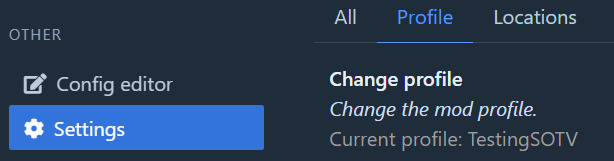
✓ Open the profile you want to update.
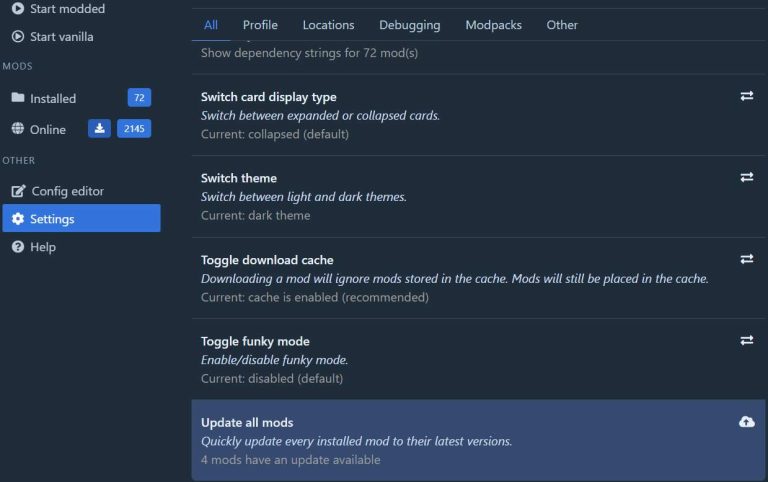
✓ Go to Settings in the sidebar.
✓ Open the All tab.
✓ Scroll down and click Update all mods.
✓ Confirm Update all to apply every available update.
Updating one by one is recommended when debugging crashes — you can see exactly which mod changed. If updates still fail, check our troubleshooting guide.
Method 2 · Update all mods
Bulk update · Click to enlarge
Quick start after install
✓ قم بتشغيل R2ModMan وحدد لعبتك from the grid.
✓ Create or choose a profile for your mod list.
✓ Open the Online tab and install mods with dependencies.
✓ Click Start modded to launch the game with your profile.
For a full walkthrough with more screenshots, visit the الدروس page.
Getting started
First launch · Click to enlarge
شفافية المصدر
R2ModMan مفتوح المصدر. تم نشر الحزمة الأساسية على Thunderstore تحت ebkr/r2modman. يتم الاحتفاظ بكود المصدر في مستودع r2modmanPlus بواسطة نفس المطور. هذا الموقع لا يستضيف ملفات التثبيت؛ ستشير أزرار الاحصل على الإصدار الموجودة في هذه الصفحة إلى عناوين URL الرسمية التي اخترتها عند تكوينها.
SHA الاختبارية والتوقيعات
عند الاحصل على الإصدار من صفحات الإصدار الرسمية، قارن تجزئة SHA-256 أو SHA-512 المنشورة بملفك المحلي باستخدام أدوات نظام التشغيل لديك. في Windows، استخدم CertUtil. في Linux، استخدم sha256sum. تؤكد التجزئة المطابقة أن الملف لم يتم تغييره أثناء النقل.
قد يتم توفير أدوات التثبيت الموقعة على بعض قنوات الإصدار. إذا كان ملف التوقيع متاحًا، فتحقق منه باستخدام المفتاح العام للمطور قبل تشغيل الإعداد القابل للتنفيذ.
إيجابيات كاذبة لمكافحة الفيروسات
يتفاعل مديرو التعديل مع أدلة اللعبة، ويقومون باحصل على الإصدار المجتمع DLLs، وقد يستخدمون أدوات التثبيت التي تؤدي إلى اكتشافات إرشادية. يُستخدم R2ModMan على نطاق واسع مع ملايين الاحصل على الإصدارات Thunderstore ولا يتم تصنيفه على أنه برنامج ضار بواسطة مجتمع المصادر المفتوحة.
تعد النتائج الإيجابية الكاذبة أكثر شيوعًا عند الاحصل على الإصدار من المرايا غير الرسمية. إذا قام برنامج مكافحة الفيروسات الخاص بك بعزل التطبيق، فلا يمكنك استعادته إلا بعد التحقق من التجزئة من مصدر رسمي. أضف الاستثناء فقط عند التأكد من سلامة الملف.